Transcribe video to text for free
Video to text converter
- Transcribe your video to text for free using AI
- Perfect the text yourself or let our team of professionals take over
- Create high quality transcripts and subtitles, export them in plain text, SRT, VTT, or EBU-STL format
4.3 on Trustpilot

4.5 on Google


Transcribe video to text for free with Amberscript
How to transcribe a video?

manually
If you’ve got time on your side, you may consider transcribing your video manually using a text editor such as Google Docs. This process is the most time consuming as it can take up to 6 hours to transcribe 1 hour of audio!

Alternatively, save time and use Amberscript’s free video to text converter. Our automatic speech recognition (ASR) engine, creates a rough draft of your text which you can the customize yourself in minutes. With machine made option you’ll get 10 minutes of free video to text transcription when you sign up!

Our team of professional transcribers will transcribe your video to text. This premium services takes the whole process off your hands, so you can have more time for other projects.
Transcription or subtitles
Choose the best service for you
Try our service – transcribe video to text for free when you sign up!
Try it freeAutomatically transform your video to text for free with our top-class service with trained ASR-model
Read moreMake your videos more accessible by adding automatically generated subtitles
Read moreWhy use Amberscript for video to text transcription?
How to transcribe a video using Amberscript
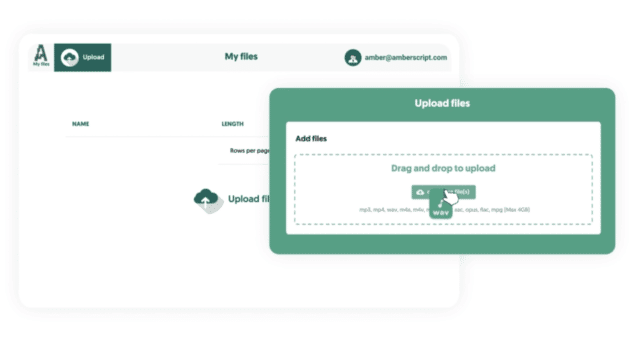
1. Upload your video files
Create your free Amberscript account and upload your video files. You’ll get 10 minutes of transcription time for free! Our ASR recognises 39 languages, so select the one your audio file contains and the number of speakers
Try it free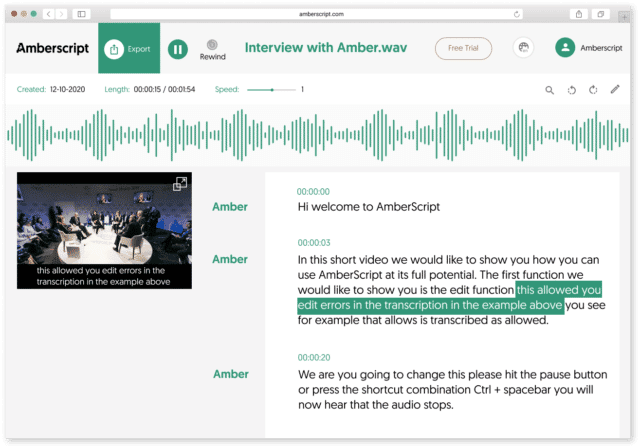
Video to text conversion
2. Machine-made or human-made text
Whether you want to create subtitles or transcripts, the process is the same. Machine-made text uses ASR to scan your video file and converts it into text. This process is up to 85% accurate, depending on the quality if your audio file. You can then perfect or customize the text yourself using our easy online editor.
Alternatively, choosing our human-made services gives you 100% accurate text. Our team of professional transcribers and captioners take the whole process from your hands and quality checks your text.
Start now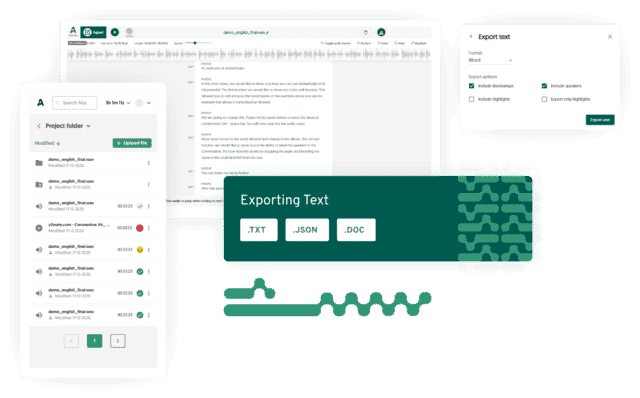
Your video to text transcription is ready!
3. Export your files
When you’re happy with your file, easily export your subtitles or transcripts into text, SRT, VTT, and plenty more file formats.
Try it freeVideo file formats we support
Convert any video type
-
MV4
This is a video container format developed by Apple, and quite similar to the MP4 format. Originally used in iTunes Store, as such files may be protected by DRM.
-
MOV
QuickTime File Format that was originally used by QuickTime framework. It can contain multiple tracks, where each of them stores a different types of data: audio, video, or text.
-
MP4
It’s a MPEG-4 Part 14 digital multimedia container format that can store video, audio, and even subtitles, or still images. Learn how to convert MP4 to text here.
The advantages of transcribing video to text with Amberscript

Transcribing your text using ASR is up to 10X faster than doing it yourself, so you can invest the time into other projects.

Depeneding on the audio quality, the ASR generad text can be up to 85% accurate. Our ASR is trained to recognized 39 languages. Or, use our human-made sercvices to get 100% accurate text in 16 languages.

With our intuitive online editor, you can edit the text yourself. If you fancy handing the whole process over to us, our team of professional transcribers and captioners will perfect the text for you. Translated subtitles are also available with our human-made service.
Frequently Asked Questions
-
Comment générer des ous-titres codés ?
Vous pouvez générer automatiquement des sous-titres codés à l’aide d’Amberscript. Notre logiciel vous permet d’exporter la transcription basée sur des fichiers audio / vidéo sous forme de fichiers SRT, EBU-STL ou VTT, qui peuvent facilement être insérés dans un éditeur vidéo. Voulez-vous en savoir plus ? Voici un guide étape par étape.
-
Comment ajouter des sous-titres à une vidéo YouTube ?
Pour ajouter des sous-titres à votre vidéo YouTube, ajoutez simplement le fichier que vous avez créé avec Amberscript à votre vidéo dans Youtube Studio. Cliquez sur «sous-titres», puis sur «ajouter» et enfin sur «télécharger le fichier» et sélectionnez le fichier SRT.
-
Ajoutez-vous des horodatages ?
Oui, les horodatages sont inclus dans la transcription. Vous pouvez choisir d’exporter la transcription avec ou sans horodatage.
-
Offrez-vous vos services dans d’autres langues ?
Oui, nous le faisons. Notre logiciel prend en charge 39 langues différentes et nous pouvons fournir des sous-titres traduits via les services de sous-titrage manuel en utilisant notre réseau d’experts dans 15 langues différentes. Des sous-titres traduits peuvent être demandés lors du processus de téléchargement. Si vous voulez demander une langue qui ne figure pas sur notre liste, merci de nous contacter.
-
Puis-je graver les sous-titres directement sur ma vidéo ?
Si vous avez exporté la transcription sous forme de fichier SRT, EBU-STL ou VTT, vous pouvez facilement les graver sur votre vidéo à l’aide d’un logiciel de montage vidéo.
-
Comment commander des sous-titres traduits ?
Pour commander des sous-titres traduits, vous pouvez télécharger votre fichier comme vous le feriez habituellement. Sélectionnez ensuite les sous-titres manuels. Une fois que vous avez sélectionné cela, une option apparaîtra où vous pourrez sélectionner la langue dans laquelle les sous-titres ont besoins d’être traduits. Si la langue que vous désirez ne fait pas partie des options, vous pouvez nous contacter via notre formulaire de contact.
Available in
39 Languages

Allemand

Anglais (UK)

Anglais (USA)

Anglais (Canada)

Anglais (Australie)
Anglais (tous les accents)

Arabe (Arabie Saoudite)

Bengali (Bangladesh)

Bengali (Inde)

Bulgare

Catalan

Chinois mandarin

Coréen

Danois
Espagnol

Farsi (Iran)

Finnois

Français
Galicien

Grec

Hébreu
Hindi

Hongrois

Indonésien

Italien

Japonais

Néerlandais

Lituanien

Népalais

Norvégien

Polonais

Portugais

Roumain

Russe

Suédois

Turc

Ukrainien
Urdu (Inde)

Urdu (Pakistan)
You might be interested in transcription services for your industry
Find out how other organisations in your industry are taking advantage of our solutions.
Learn more

 Transcription automatique